Chart of Accounts
📝 Introduction
The Chart of Accounts (COA) is a foundational component in ledger accounting, providing a structured framework for organizing financial transactions. This guide outlines the function and importance of the Chart of Accounts within the ledger accounting module.
The Chart of Accounts serves as a comprehensive listing of all accounts used in the accounting system. Each account is assigned a unique code and is categorized to facilitate the accurate recording and reporting of financial data.

🛠️ Usage
Account Setup:
Initialization: When setting up a new accounting database, the first step involves defining the Chart of Accounts. This ensures that all financial transactions can be correctly categorized from the beginning.
Customization: Users can tailor the COA to fit the specific needs of their organization, adding or removing accounts as necessary.
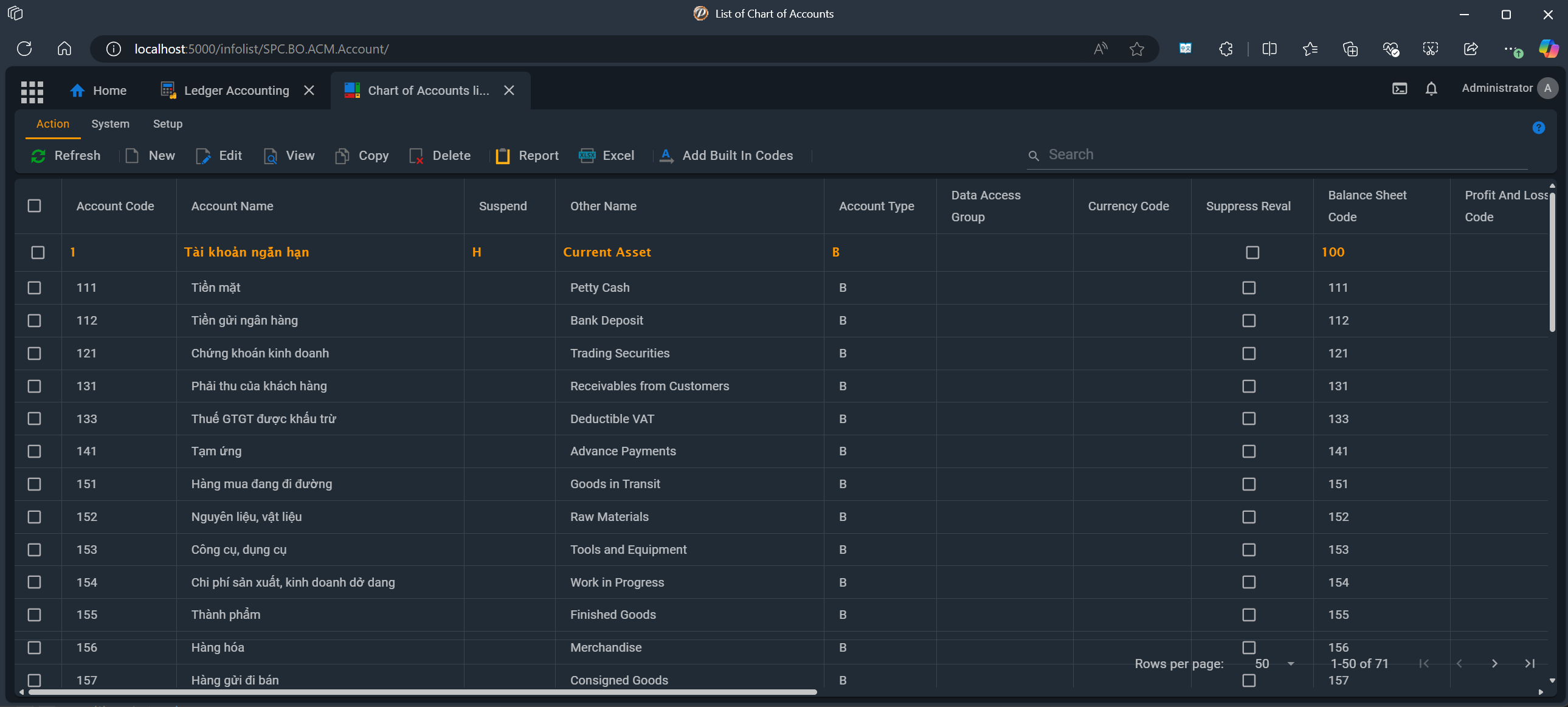
During Initialization, user may uses command  AddBuiltInCodes to copy predefined accounts to the accounting database.
Hierarchical Structure: The COA can be organized hierarchically, allowing for sub-accounts under main account categories. This hierarchy provides detailed insight into specific areas of financial activity.
Transaction Recording:
The COA is used for booking ledger journals on a day-to-day basis. Each transaction is recorded against the appropriate account, ensuring accurate financial tracking.
By using a predefined list of accounts, the COA helps maintain consistency in financial reporting and analysis.
Reporting:
Financial Statements: The structured nature of the COA, mapped Balance sheet code and P/L code facilitate the generation of key financial statements, such as the balance sheet and income statement.
🔖 Best Practices
Regular Updates: Keep the COA updated to reflect any changes in your organization’s financial structure.
Consistent Categorization: Ensure consistency in account categorization to enhance the accuracy of financial reports.
Periodic Reviews: Conduct periodic reviews of the COA to identify and address any issues promptly.
🏷️ Data Fields
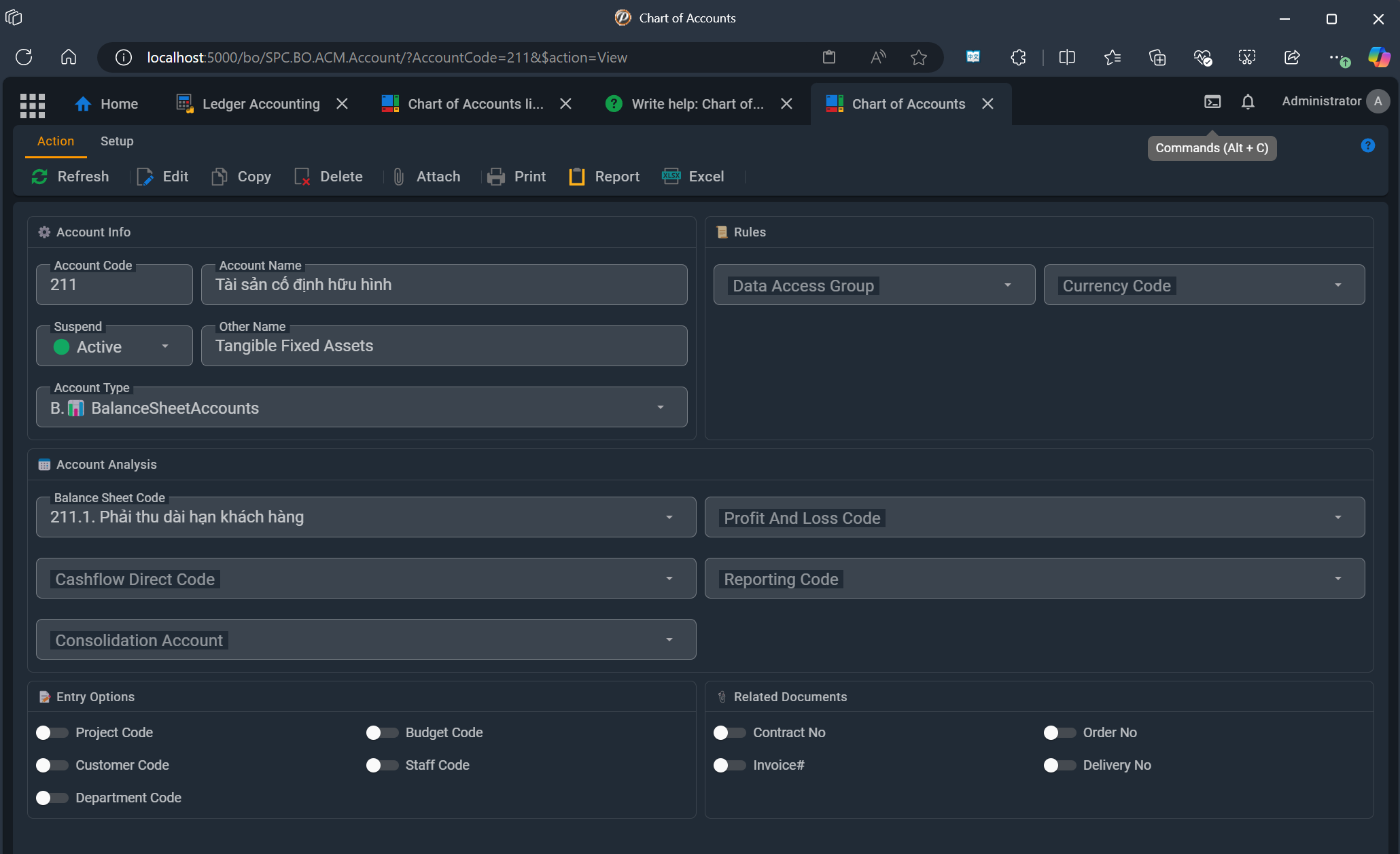
Account Info
- 🔑 AccountCode
- The unique code of account.
- 📝 AccountName
- Set the name for this account.
- 📝 Suspend 🔗 Suspending status
- Let empty if account is active. Suspend it if you do not user to use it for booking a ledger journal.
- 📝 OtherName
- Account name in other language
- 📝 AccountType 🔗 Ledger Account Type
- Accounts are grouped into categories such as Balance Account, profit and loss account, creditor account , debtor account , T-client account and Memo account. This classification aids in organizing and summarizing financial data.
Rules
- 📝 DataAccessGroup 🔗 Data Access Group
- Assign the group, which allows or prevents user from using this account.
- 📝 CurrencyCode 🔗 Currency
- Transaction booked to this account requires currency code, declared here
Currency
- 📝 SuppressReval
-
Turn On to ignore this account during revaluation
Account Analysis
User may need to adjust the mapped codes for accounts. Mapped codes are codes that link each account to specific financial report categories, such as the Balance Sheet, Profit and Loss, and Cash Flow statements. This mapping ensures that financial data is consistently categorized and can be easily integrated into financial reports.
By mapping accounts to Balance Sheet, Profit and Loss, and Cash Flow codes, financial reports can be produced automatically. This eliminates the need for manual categorization and reduces the risk of errors.
The ReportingCode codes group accounts into categories that align with financial reporting requirements, ensuring that all transactions are correctly classified and reported.
- 📝 BalanceSheetCode 🔗 List of Balance Sheet Code
- Select Balance Sheet criteria mapping
- 📝 ProfitAndLossCode 🔗 List of P/L Code
- Select Profit and Loss Code
- 📝 CashflowDirectCode 🔗 List of Cash flow Code
- Select Profit and Loss Code
- 📝 ReportingCode
- Select Reporting Code
- 📝 ConsolidationAccount
Select Consolidation account. this is used for generating data send to head office
Mapping Accounts to Consolidation Accounts (Head Office Accounts)
Consolidation accounts, also known as head office accounts, are used to aggregate financial data from various subsidiary or branch accounts into a single, unified set of financial statements.
Mapping individual accounts to consolidation accounts allows for the aggregation of financial data across different branches or subsidiaries. This ensures that all financial activity is accurately reflected in the head office's financial statements.
The use of consolidation accounts simplifies the process of generating consolidated financial reports. It reduces the complexity involved in combining financial data from multiple sources.

🎫 Example An organization with multiple branches may have separate accounts for revenue in each branch. By mapping these accounts to a single consolidation account for revenue, the organization can easily generate a consolidated income statement that reflects total revenue from all branches.
Entry Options
When a user utilizes an account for a journal entry, additional data may be required based on the selected account to ensure the journal's validity. These specific requirements are configured within each account.
- 📝 ProjectCode
- Turn on to input project code to the transaction
- 📝 BudgetCode
- Turn on to input budget/expenditure code to the transaction
- 📝 CustomerCode
- Turn on to input customer/supplier code to the transaction
- 📝 StaffCode
- Turn on to input staff code to the transaction
- 📝 DepartmentCode
- Turn on to input the department code to the transaction
Related Documents
- 📝 ContractNo
- Turn on to input the contract number for this account
- 📝 OrderNo
- Turn on to input the order number for this account
- 📝 InvoiceNo
- Turn on to input the invoice number for this account
- 📝 DeliveryNo
-
Turn on to input the delivery number for this account